What is a Grade Calculator?
Grade Calculator converts your overall academic scores into a single, actionable percentage. It answers the one question every student asks: "Am I passing?" But it is not just a simple calculator.
Most students try to calculate their weighted grade by simply adding up points. This works for basic assignments. But it fails completely when a professor uses Weighted Categories.
Grade calculator handles the two main grading system:
- Point-Based Systems: This is simple arithmetic. If you earned 850 points out of 1,000 possible points, you have an 85%.
- Weighted Averages: This is where the math gets tricky. Your Final Exam might be worth 30% of your grade, while a Homework assignment is only worth 5%.
It applies these "weights" to your scores to show you exactly where you stand. It allows you to calculate the exact score you need on a Final Exam to keep your A.
We see students panic because they average their scores (e.g., 90 + 60 / 2 = 75) without realizing the 90 was a quiz and the 60 was a major exam, making their actual grade much lower.
Types of Grading Math
| Feature | Point-Based System | Weighted System |
|---|---|---|
| Math Logic | Simple Ratio (Part / Whole) | Percentage Allocation |
| Flexibility | Low (All points are equal) | High (Exams count more) |
| Typical Use | K-12, Math Classes | University, AP Courses |
| Complexity | Low | High |
| Transparency | High | Moderate |
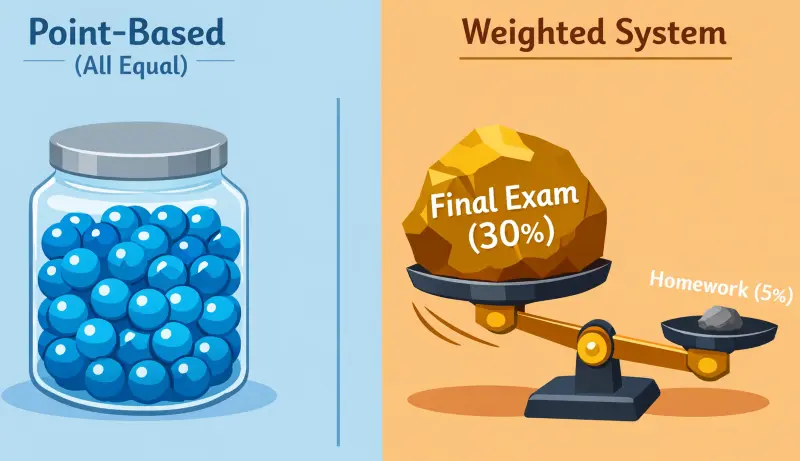
In a Weighted System, assignments are not created equal. A final exam outweighs weeks of homework.
How to Use a Grade Calculator?
Using a grade calculator should not be harder than the class itself, it's as easy as our gpa calculator. We made this to be easy and helpful for exam grades. However, getting the settings right is important for accuracy. Here is exactly how to set it up:
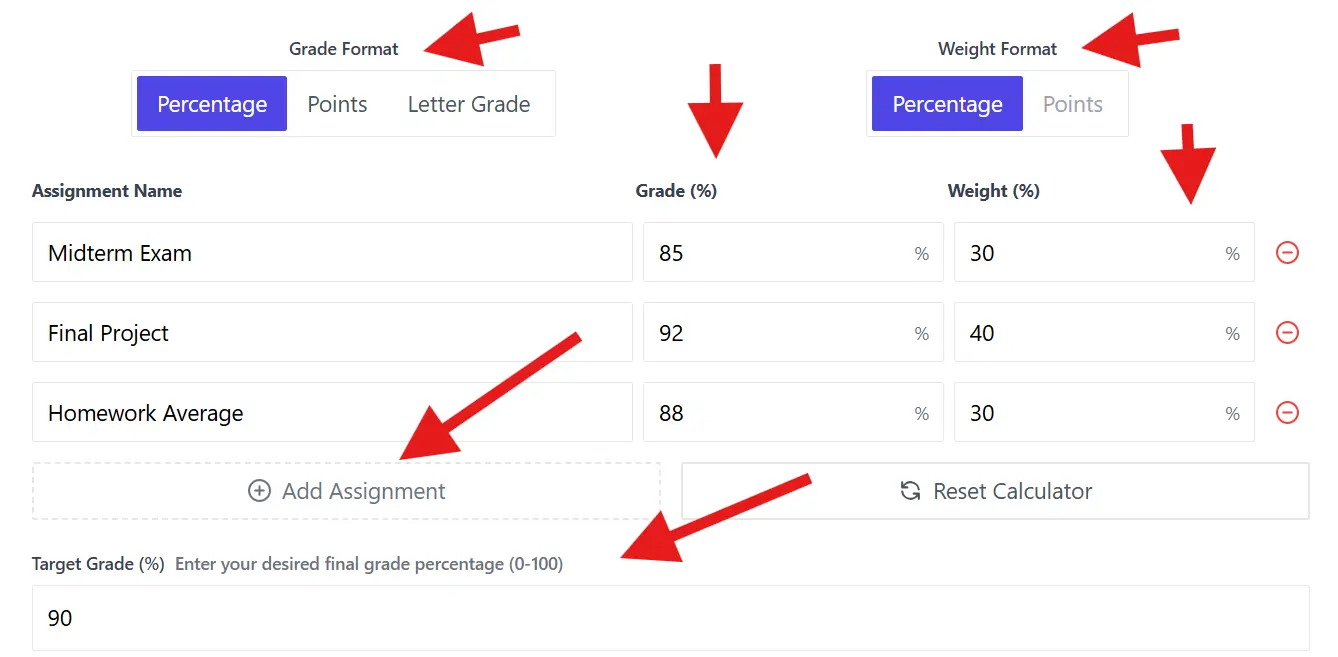
1. Choose Your Grade Format
Select the grade format, you have three options:
- Percentage: Best if your syllabus lists grades as 0-100 (e.g., "92%").
- Points: Best for grade calculator points based classes (e.g., "85/100").
- Letter Grade: Select this if you only know you got a "B+" or "A-".
2. Select Your Weighting Mode
This is the most important part. Does your syllabus say "Exams are 40%"? If yes, choose Percentage. If your class is just a total sum of all points earned (e.g., 1000 points total), choose Points.
3. Add Your Assignments
Now, input your data. You can add as many rows as you need. Be specific with your labels:
- Assignment Name: Type "Midterm" or "Final Project." (Optional)
- Grade: Enter the score you received.
- Weight: Enter how much that grade calculator test was worth.
Make sure to avoid it to trigger calculation errors by mixing formats, such as entering a "50" for a weight (50%) when the tool is expecting a point value (50 points).
4. Set Your Target Grade (Optional)
Do you want to know what you need for the final? Enter your goal in the "Target Grade" box (e.g., 90%). It will run the algebra to show you the exact score required on your remaining work.
5. Analyze The Results
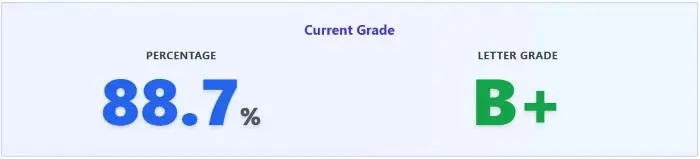
Scroll down to the results section. You will see three key metrics: The detailed result is folded by default, click on show detailed result.
- Current Grade: Your average based only on the work you have turned in.
- Weight Distribution: A check to ensure your weights add up to 100%.
- Target Achievement: A "Yes/No" reality check on whether your goal is mathematically possible.
Final Exam Calculator
This is the most critical question of the semester. You are sitting at an 82% and want to know if an "A" is still possible. A grade calculator final feature does more than add numbers. It works backward. It reverses the math to solve for the missing variable: Your Final Exam Score.
The Formula:
To find out exactly what you need, the calculator uses this specific algebraic formula:
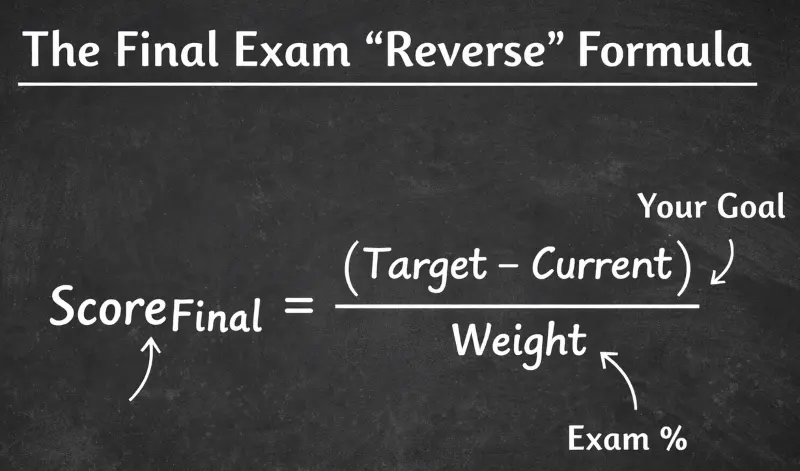
Our calculator uses this reverse-algebra formula to solve for the missing variable: the score you need to pass.
Here is how it works in plain English:
- It takes your Target Grade (e.g., 90%).
- It subtracts the points you have already "locked in" from your previous work.
- It divides the remainder by the weight of the grade calculator final exam.
This tells you the raw percentage you must earn to hit your goal. If you have a 70% average entering a final worth 20%, even a perfect 100% score will only raise your final grade to a 76%.
Final Exam:
It is helpful to see the math in action before you take the test. Here is how different weights impact your required score:
| Current Grade | Target Grade | Final Exam Weight | Score Needed on Final |
|---|---|---|---|
| 85% (B) | 90% (A) | 20% | 110% (Impossible) |
| 85% (B) | 90% (A) | 40% | 97.5% (Very Hard) |
| 78% (C+) | 80% (B-) | 15% | 91.3% (Doable) |
| 60% (D-) | 70% (C-) | 25% | 100% (Perfect Score) |

If the calculator says you need >100%, you cannot reach your goal without extra credit. Check your math early!
If the "Score Needed" is above 100%, you need extra credit to reach that goal. Use our easy grade calculator early in the semester to adjust your study habits before math becomes impossible.
Points-Based vs. Weighted Grading
Most grading confusion comes from one simple misunderstanding. Students often do not know which mathematical model their professor is using. There are two main systems. The calculator settings must match your syllabus exactly, or the result will be wrong.
A: The Points System ( aka. Unweighted)
This is the simplest format. It is a grade calculator point based system often found in K-12 education or pure math courses.
How Points System Works:
Every point is equal. A point earned on a homework assignment is worth exactly the same as a point earned on a final exam.
- The Math: Total Points Earned / Total Points Possible.
- Example: If you earned 450 points out of a total of 500, your grade is 90%.
Experience Signal: In my analysis of student data, the most common error in point-based systems is failing to subtract "optional" or "dropped" assignments from the total possible denominator, resulting in an artificially low calculated grade.
B: The Weighted System ( aka. Percentage)
This is the standard for University and AP courses. This is a grade calculator with weights, meaning categories have different values.
How it works:
Points are not equal. Your professor assigns a percentage to each category (e.g., "Tests are 60%," "Homework is 10%"). Getting a 100% on a Homework assignment will not move your grade. But getting a 100% on a Test moves it significantly.
Why this matters:
Even if you get perfect scores on every homework, failing in weighted exams can still cause you to fail the class.
How Points & Weighted Mode Works
Here is the same student performance calculated two different ways:
| Assignment | Score | Points Mode Impact | Weighted Mode Impact (Tests = 50%) |
|---|---|---|---|
| Homework | 100/100 | High (100 pts added) | Low (Only 10% of grade) |
| Big Exam | 70/100 | High (100 pts added) | Massive (50% of grade) |
| Final Result | -- | 85% (B) | 75% (C) |
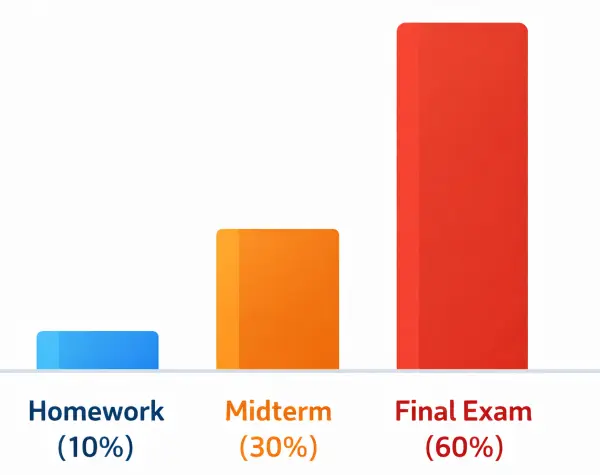
This is why you can get 100% on every homework assignment and still fail the class if you bomb the weighted Final Exam.
Always check your syllabus. If you see percentages (e.g., 20%, 30%), you must use the Weighted mode.
GPA & Letter Grades in Colleges
University grading is different from high school. In a grade calculator college setting, your percentage is not the final metric. It is just a stepping stone. Here is the deal:
Your professor calculates a percentage (e.g., 88%). But the University Registrar converts that number into a "Quality Point" or GPA (e.g., 3.3). This conversion is what determines your academic standing, scholarship eligibility, and graduation honors.
The Rules of College Grading:
Not all schools use the same math:
- The Harvard Rule: Many elite institutions, including the Harvard Faculty of Arts and Sciences, do not award an A+. The scale stops at 4.0.
- The UC Cap: The University of California system uses a specific "Weighted and Capped" GPA. They limit the number of honors points you can earn, meaning a grade calculator percentage for UC admissions requires special logic.
- Program Thresholds: If you are in a specialized major like Nursing (BSN), a "Passing Grade" might be much higher than standard. A 74% is often the minimum to pass, whereas a 60% would pass in a History class.
| Program/Institution | Minimum Passing % | Quality Point Value | Administrative Rule |
|---|---|---|---|
| Yale Nursing | 74.0% | Pass (P) | No Rounding |
| UF Nursing | 74.0% | 2.0 (C) | Minimum Progress |
| Baruch CUNY | 60.0% | 1.0 (D) | General Standard |
| Fresno State Nursing | 75.0% | 2.0 (C) | Prerequisite Min |
| UT Arlington Nursing | 70.0% | 2.0 (C) | Weighted Exam Rule |
Do not ignore the "Letter Grade" on your syllabus and focus strictly on the "Quality Points," as a 3.7 (A-) impacts your cumulative GPA significantly differently than a 4.0 (A) despite being only 1-2 percentage points apart.
Percentage to GPA Conversion
This table shows the standard US conversion. Use this to translate your grade calculator percentage into a GPA.
| Letter Grade | Standard Percentage | Quality Points (4.0 Scale) | Meaning |
|---|---|---|---|
| A | 93% - 100% | 4.0 | Excellent |
| A- | 90% - 92% | 3.7 | |
| B+ | 87% - 89% | 3.3 | Good |
| B | 83% - 86% | 3.0 | |
| B- | 80% - 82% | 2.7 | |
| C+ | 77% - 79% | 2.3 | Satisfactory |
| C | 73% - 76% | 2.0 | Average |
| D | 60% - 69% | 1.0 | Poor (Passing) |
| F | Below 60% | 0.0 | Failure |
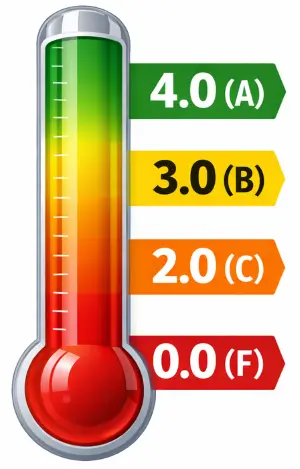
Your raw percentage is just a step. The University Registrar converts it into "Quality Points" (GPA) for your permanent record.
Never assume 89.5% will round up to a 90% (A-). Professors have academic freedom to set strict cutoffs. Always calculate based on the lower bound to be safe.
Semester Grade Calculation
Tracking a grade for a single assignment is easy. But managing a grade calculator semester strategy is different.
One bad quiz can drop you from an "A" to a "C" instantly because there are so few points in the system. But as the semester progresses, your grade "hardens." Mathematically, this is called Grade Inertia. By November, even a perfect score on a homework assignment might only raise your average by 0.01%.
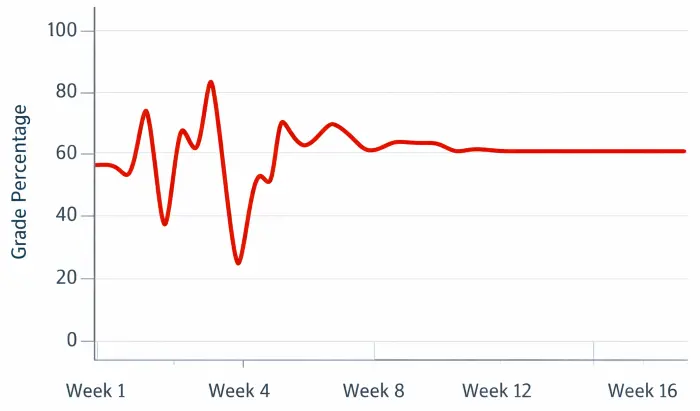
"Grade Inertia" means your grade "hardens" over time. By November, a single assignment barely moves the needle.
Cumulative vs. Current Grade
To track your semester correctly, you must understand the two ways this tool calculates your standing:
- Current Grade:
This ignores all assignments you have not turned in yet. It tells you: "Based on what you have done so far, this is your performance."
Best For: Checking mid-semester progress. - Cumulative Grade:
This treats every empty box as a Zero. It tells you: "If you stopped working today, this is what you would get."
Best For: End-of-semester reality checks.
How to Track Your Semester
Do not just check your grade once. Make it a habit to check everything.
| Time of Semester | Action Item | Goal |
|---|---|---|
| Weeks 1-4 | Input Syllabus Weights | Verify setup matches the professor's rules. |
| Midterms | Check "Current Grade" | Decide if you need to withdraw or hire a tutor. |
| Finals Week | Use "Target Grade" | Calculate exactly what you need to pass. |
Grading Formulas
Do you trust the machine? Most students do. But some want to see the math themselves. If you are building your own spreadsheet for grades or just want to verify our results, here are the exact formulas we use.
1. Weighted Average Formula
It calculates your grade by summing up the product of every score and its weight. The formula looks like this:
How to use it Weighted Average Formula:
- Convert all weights to decimals (e.g., 20% becomes 0.20).
- Multiply each assignment score by its weight.
- Add them all together.
Example of Weighted Average Calculation:
- Test (90%) worth 60% of grade → 90 × 0.60 = 54
- Homework (100%) worth 40% of grade → 100 × 0.40 = 40
- Final Grade: 54 + 40 = 94%
2. Target Grade Formula
This is the logic that powers the Target Grade feature. It works backward from your goal to show the exact score you must earn on the final exam.
The Excel Formula:
If you are building a grade calculator in excel with formula, you can paste this directly into a cell.
Assuming:
- A1 = Current Grade (as decimal)
- B1 = Target Grade (as decimal)
- C1 = Final Exam Weight (as decimal)
The formula is:
=(B1 - (A1 * (1 - C1))) / C1
Frequently Asked Questions
How do I calculate my grade if it is point-based?
It is a simple division. If your syllabus does not list percentages (like "Exams are 40%"), you are likely in a grade calculation point based system. To solve this manually:
- Add up every point you have earned.
- Add up every point that was possible to earn.
- Divide "Earned" by "Possible" and multiply by 100.
- Example: 850 / 1000 = 85%.
Can I calculate my grade for the whole semester?
Yes. To track a full grade semester timeline, simply add new rows for every assignment as you complete them.
How do I enter a test grade vs a homework grade?
Names are optionals, leave them blank or enter (e.g., "Test 1" vs. "Essay"). It only focuses on weight. If a grade test is worth 20% of your grade, enter "20" in the weight column. You can group them (e.g., "All Homework" = 10%) or enter them individually.
What if my course uses weighted percentages?
You must ensure your math adds up to 100%. If your entered weights only total 90%, the calculator will alert you. This usually happens when a student forgets a category, like "Participation" or "Attendance," which often accounts for that missing 10%.
Is an 89.5% an A or a B?
This is the most common question for students. The answer depends entirely on your professor's syllabus.
- Strict Scale: 89.99% is a B+.
- Rounding Scale: 89.5% rounds up to a 90% (A-).
Our tool provides the exact decimal (e.g., 89.52%) so you can compare it against your school's specific policy.
How do I calculate what I need on the final exam?
Use the "Target Grade" feature. Enter the grade you want for the course (e.g., 90%). The calculator will instantly tell you if it is mathematically possible. If the result says "105%," you mathematically cannot achieve that grade without extra credit. But it will give you a detailed result with a proper message.
What is the difference between weighted and unweighted GPA?
This difference matters a lot when it comes to college admissions.
- Unweighted GPA: Treats all classes equally. An "A" in PE is worth 4.0, just like an "A" in AP Physics.
- Weighted GPA: Awards extra points for difficulty. An "A" in an AP/Honors class might be worth 5.0.
Check if your school uses a grade scale (4.0) or a weighted high school scale (5.0+).
Does a "Zero" hurt my grade more than a "50"?
Yes, significantly. A zero is a dead weight. Since averages are based on division, a zero pulls your grade down much faster than a failing grade of 50.
- Example: Average of (100, 100, 0) is 66% (D).
- Example: Average of (100, 100, 50) is 83% (B).
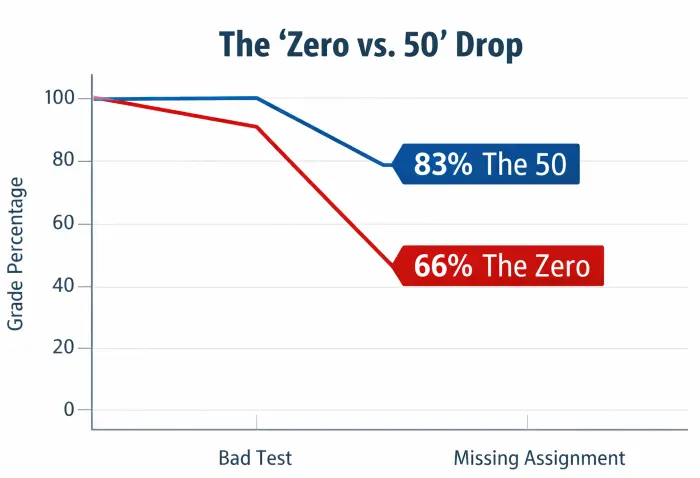
Never take a Zero. As the graph shows, a 50% (F) keeps you alive, but a 0% (Missing) destroys your average.
Always turn in something, even if it is incomplete.
How do I calculate my grade if I dropped an assignment?
Simply delete that row from the calculator (on the right side you will see a cross icon). Do not enter "0" or leave it blank. If your professor says "We drop the lowest quiz," physically remove that quiz from your list.
What is a "good" college GPA?
It depends on your goals.
- Grad School / Med School: Typically requires a 3.5+.
- Good Standing: Most universities require a 2.0 (C average) to stay enrolled.
- Honors (Cum Laude): Usually starts at 3.5 or 3.6.
Use the "Percentage to Letter" table above to see where your current percentage fits on the 4.0 scale.